Bifrost

Bifrost: Bridge Files to Your Phone via QR Code#
The Problem#
Let’s say you need to move a file between your computer and your phone, but you’re on Linux, and the phone could be Android or iPhone.
Your options are pretty much all bad: email it to yourself, upload it to Google Drive, wrestle with MTP over a cable, or install some app that wants an account and routes your data through someone else’s server. AirDrop? Only if you’ve bought fully into Apple’s ecosystem.
In this case, all I wanted was to get a GPX route file onto my phone before a motorcycle trip. That shouldn’t require a cloud account or a five-step workaround.
The Solution#
Bifrost is a single Go binary that starts an HTTP server on your LAN, generates a QR code, and lets your phone download or upload files by scanning it. No cloud, no cables, no apps, no accounts.
# Send a file
bifrost myfile.gpx

# Receive files
bifrost -r -o ~/Downloads

# Browse a directory
bifrost -d ~/Photos
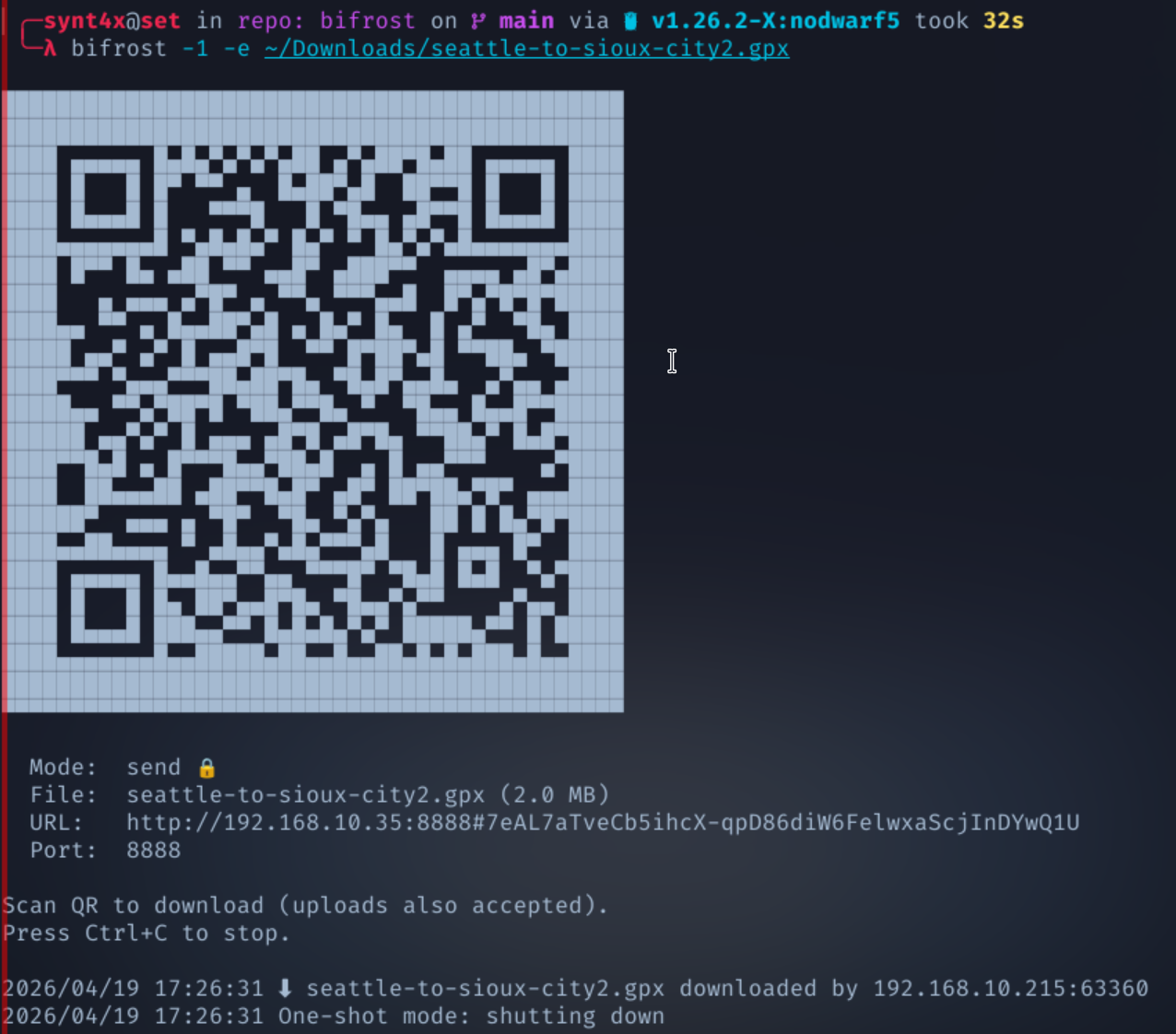
Scan the QR code. Done.
Encryption Without HTTPS#
In case you’re one of those folks that treat security as paramount, add -e and Bifrost generates a random AES-256-GCM key, embeds it in the URL fragment (#), and bakes that into the QR code:
http://192.168.1.42:8888#RQx8gkmHh6Q...
The generated fragment never leaves the browser; it’s not sent in HTTP requests. The server encrypts file data with that key; the browser decrypts it client-side. An attacker passively sniffing your LAN traffic would see only ciphertext and has no key.
A note on threat model: because the JavaScript that handles decryption is served over plain HTTP, an attacker doing active MITM on your LAN (ARP spoofing, rogue AP, etc.) could theoretically swap the JS and extract the key. The encryption protects against passive observation, not against an attacker who already controls your network.
Why Not HTTPS?#
HTTPS on a LAN means self-signed certificates, which means training users to click through “Your connection is not private” warnings. In my opinion, normalizing that behavior is worse than the problem it solves; it teaches people to ignore the one warning that actually matters on the real internet.
Instead, Bifrost uses the URL fragment as a key exchange channel. The fragment is part of the QR code (a direct optical transfer), never touches the network, and the actual file data itself is AES-256-GCM encrypted. You get real encryption without having to reinforce bad habits.
The Web Crypto Problem#
There’s a catch: the Web Crypto API (crypto.subtle) only works in secure contexts — that is, HTTPS or localhost. A phone hitting http://192.168.x.x doesn’t qualify.
So Bifrost ships a pure JavaScript AES-256-GCM implementation as a fallback. When Web Crypto isn’t available (which is always on LAN over HTTP), it handles the full AES key expansion, CTR-mode encryption, and GCM authentication tag computation in JS. Same nonce-prepended ciphertext format as the Go server side, fully interoperable — verified by automated tests that force the pure JS path and round-trip against Go’s crypto/aes.
The Safari Caching Bug#
Getting this working was harder than expected. The pure JS crypto passed all tests on desktop browsers, but encrypted downloads silently failed on iPhone Safari. The decrypted output was garbage.
The debugging rabbit hole went deep: base64 padding differences (Safari’s atob() is stricter than Chrome’s), variable scoping quirks (const inside try blocks isn’t visible in catch on Safari), and finally, the real culprit ended up being HTTP caching. Safari was aggressively caching responses and serving stale plaintext from a previous unencrypted test run when the encrypted download hit the same URL. The request never even reached the server.
The fix was a cache-busting query parameter (?t=Date.now()) on download URLs plus Cache-Control: no-store headers on encrypted responses. A one-line fix after hours of debugging — the classic.
Lessons#
The whole exercise reinforced why I wanted to avoid HTTPS in the first place. Adding a self-signed cert would have “solved” the Web Crypto problem but introduced a worse one. Instead, the pure JS fallback works everywhere as tested on Safari, Brave, and Firefox on both iOS and Android, without training users to ignore certificate warnings.
Features#
- Two-way transfers — send and receive files in the same session
- Directory browsing — serve a folder as a mobile-friendly file picker
- AES-256-GCM encryption with key embedded in the QR code
- One-shot mode (
-1) — server exits after first transfer - Progress bars — real-time upload/download progress on mobile
- Cross-platform — Linux, macOS, Windows (amd64 + arm64)
- Zero dependencies — single static binary, ~8MB
Install#
# Download a binary
curl -LO https://github.com/axiom0x0/bifrost/releases/latest/download/bifrost-linux-amd64
chmod +x bifrost-linux-amd64
sudo mv bifrost-linux-amd64 /usr/local/bin/bifrost

# Or build from source
go install github.com/axiom0x0/bifrost@latest
GitHub: axiom0x0/bifrost